
Voice Observations in Open-Plan Classrooms: Practical Solutions
Open-plan classrooms are becoming a cornerstone of modern school design. These dynamic, flexible spaces encourage collaboration, peer-to-peer learning, and a sense of community. But for teachers, they present a unique challenge: how do you capture meaningful, individual student observations amidst the lively hum of activity? When multiple groups are working on different tasks, the idea of stopping to write detailed notes feels impractical, if not impossible. This is where the power of voice observation comes in, offering a fluid and authentic way to document learning as it happens. But how do you make it work in a noisy, shared environment?
Why Voice Observations are a Game-Changer for Teachers
Before we tackle the challenges, it’s important to understand why voice observations are rapidly becoming an essential part of the modern teacher's toolkit. The primary advantage is speed and authenticity. Instead of trying to summarise a learning moment in writing, which takes time and removes you from the flow of the classroom, you can capture it in real-time with a quick 30 to 60-second voice note. This practice significantly helps to reduce teacher workload while building a richer, more nuanced picture of each child's development.
With a platform like Parent Portal, these voice notes become powerful data points. A teacher can record a quick observation, which is then automatically transcribed and can be linked directly to specific EYFS or National Curriculum objectives. It's an observation, an evidence entry, and a progress marker all in one swift action. Capturing a child explaining their thinking in their own words provides an insight that a checklist or written note simply cannot match. It’s a tool that respects the dynamic nature of learning and the demanding reality of teaching.
The Unique Challenges of Observing in Open-Plan Spaces
While the benefits are clear, the open-plan environment introduces hurdles. The most obvious is background noise. With several activities running concurrently, how can you ensure your recording is clear and focused on the intended child? Another concern is discretion. Pulling out a device to record can sometimes feel intrusive, potentially distracting the child or making them self-conscious, which can alter the very behaviour you wish to capture. Finally, in a sea of voices, attribution can be tricky. When you listen back, you need to be certain about who said what. These are valid concerns that can make teachers hesitant to adopt voice observation technology.
The goal of observation is not to simply see what children are doing, but to understand what they are thinking. It is in the fleeting moments of discovery and explanation that the truest learning is revealed.
Overcoming these challenges isn't about finding a perfectly silent moment—it's about adopting smart strategies and using tools designed for the reality of the classroom. The focus should shift from capturing a studio-quality recording to capturing an authentic moment with enough clarity for its purpose: assessment and sharing. With a few simple techniques, any teacher can master the art of voice observation, regardless of their classroom layout.
Practical Strategies for Effective Voice Recording
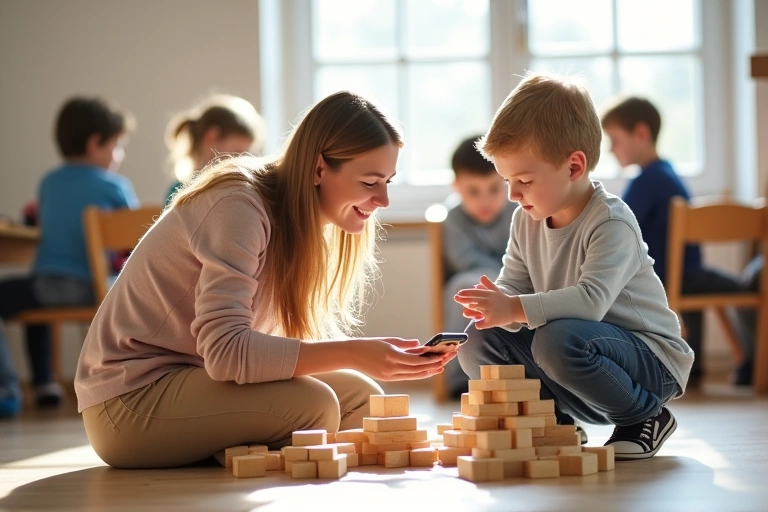
Making voice observations work in a bustling classroom is less about expensive equipment and more about technique. The first and most crucial strategy is getting close. Physical proximity is your best friend in combating background noise. Kneel down to the child's level, engage with them directly, and hold your device naturally as part of the conversation. This ensures their voice is the primary audio source.
Next, use 'scaffolding language' to frame your recording. Begin your voice note by quietly stating the context, such as, "Observation for Sam, who is explaining his LEGO model." This small step removes any ambiguity later on and provides context for yourself, for colleagues, and even for an AI analysis tool. It's also vital to embrace the 'micro-observation' format. You aren't recording a lecture; you're capturing a gem of insight. A 30-second clip of a child using a new piece of vocabulary or articulating a mathematical concept is incredibly potent. The final technique is the 'walk and talk'. After witnessing a key moment, you can simply step away to a quieter corner of the room or a breakout space to record your summary of what just happened. This separates the observation itself from the act of recording, ensuring crystal-clear audio.
• Micro-Observations: Keep recordings short and focused (30-60 seconds) to capture the essence of a learning moment.
• Automatic Transcription: Voice notes are instantly converted to text, making them searchable and easy to review.
• Curriculum Tagging: Link observations directly to EYFS or National Curriculum objectives to track progress automatically.
• AI-Powered Analysis: The system analyses accumulated observations to highlight patterns, suggest next steps, and even help draft report comments.
These practical approaches demystify the process, turning a potential challenge into a simple, repeatable workflow. They allow you to integrate observation seamlessly into your teaching practice, rather than it being a separate, time-consuming administrative task. The result is more frequent, higher-quality evidence of learning with significantly less effort.
Leveraging Technology to Overcome the Noise
Modern technology is surprisingly well-equipped for the classroom environment. The microphones on today's smartphones and tablets are highly effective at focusing on nearby sound sources. However, for educators looking for an extra edge, a simple, inexpensive lapel microphone that plugs into a device can make a dramatic difference, isolating the speaker's voice almost completely. This small investment can perfect your observation workflow.
Beyond hardware, the right school admin software makes all the difference. Parent Portal is designed with the realities of the classroom in mind. Our AI-powered transcription is built to be robust, capable of filtering out moderate background noise and accurately identifying the primary speaker's words. Furthermore, our essential 'approval workflow' feature empowers teachers. Before any observation is shared with a parent or finalised in a child's learning journey, the teacher can listen back, edit the transcript for accuracy, and add any necessary notes. This human-in-the-loop system ensures that technology serves the teacher, not the other way around, guaranteeing that all records are accurate and professional.
– Sarah T., Year 2 Teacher
This blend of simple hardware, smart strategies, and purpose-built software transforms voice observation from a theoretical ideal into a daily reality. It bridges the gap between the chaotic, beautiful mess of real-world learning and the structured need for assessment and reporting.
Embracing the Future of Classroom Observation
The true power of these voice notes is what happens after they're recorded. In Parent Portal, each observation becomes part of a child's cumulative digital profile. Our AI tools analyse these snippets over time to identify learning patterns, highlight areas of strength, and suggest potential next steps. This automated analysis saves teachers countless hours and delivers data-driven insights that can genuinely inform planning and differentiation. When it comes to writing end-of-term reports, the AI Report Writing Assistant can draw upon this wealth of authentic evidence to generate unique, personalised comments for each child, a clear example of how to reduce teacher workload effectively.
This workflow exemplifies the future of edtech 2025: technology that is intelligent, intuitive, and integrated. It's not about adding another task to a teacher's plate. It's about using smart school communication tools to enhance teaching, deepen parent engagement, and streamline evidence-gathering. By transforming fleeting moments of learning into a longitudinal record of progress, schools can build a comprehensive understanding of every child. Open-plan classrooms and voice observations aren't just compatible; with the right approach, they are the perfect pairing for a modern, responsive, and efficient educational environment.
Comments